Google commands nearly 80% of Web and 90% of mobile search traffic on the planet. With global search leaders such as Yahoo, Bing (Microsoft), and Baidu (in China) still commanding between 5 and 15 percent each, they are forces not to be ignored, but we know the clear winner of this battle in the war for consumers’ attention. People google things. And, they’re googling your business’ products or services to see Google reviews.
So Google has decided that these local reviews of your products or services are important to the decision-making process for consumers. And, if the search juggernaut thinks this is important, it’s best to take advantage of the opportunity that Google’s review platform provides (which is built within Google Maps and is managed with the Google My Business dashboard).
Often, local businesses don’t understand how to gain traction with Google reviews. Or, they don’t understand Google’s review policy. So, here I’d like to outline how to take your business to the next level with getting (mostly good) Google reviews.
Note: If you have a bad product, service, location, staff or customer service, this methodology won’t help you, unless you decide to fix these management/operations issues. I can’t also help you remove Google reviews. If the problem is deeper than that and not working, I’d head over to the Google My Business community to learn how to handle spam, fraudulent, and other wrongful review issues.
Get Your Google My Business Listing Completed Fully | Getting Google Reviews
To start, get your business listing claimed and verified. Not everyone can have a business listing on Google My Business; I don’t make the rules, but you do need to follow them. You will need a Google account (or G Suite account), so create one or sign in using yours to Google My Business, then follow the “get your business listing claimed and verified” support article. While you can do this on a mobile device, I recommend doing so from your desktop Web browser so you have all functionality available to you.
Set Your Review Capture System Up | Getting Google Reviews
Now that you have your business listing claimed and verified, you can watching the Google reviews pour in, right? Uhm, no. Sorry. There’s still quite a bit of work ahead. But, that’s an important milestone on your way to getting (mostly good) Google reviews! To really start getting the reviews flowing, follow my three-step process for soliciting and capturing customers’ reviews on Google.
Step One
Get your Google Review link. I don’t know them, but (for creating such a great tool and being Canadian, I can’t help but think they’re good and nice people) the folks over at White Spark agency have provided the free Google Review Link Generator.
Step Two
Create a special customer service email address that is handled by someone dedicated to handling negative feedback, preferably you or someone high enough to make substantive, timely decisions and actions to turn unsatisfied customers into raving brand advocates.
A happy customer who buys and leaves your business and says nothing about you to anyone is of no really value in the world of reviews. An unhappy customer that you’ve helped fix their issue is one that will tell many more people about his or her experience and has a great value to you for review purposes! Seize opportunities of unhappy customers turned happy ones, and the meat of how to do this is in Step Three.
Step Three
Send your customers either upon purchase, delivery or at their highest satisfaction peak in your relationship, a review request. Turn this into a system that is executed precisely and consistently throughout your business operations.
This review request communication will read something like this:
Hi, [Customer’s Name],
We appreciate your business! As part of our process to continually make good on our [product/service] and our customer service promises, we would really appreciate your feedback. This also helps new customers evaluate our [product/service/business] and helps us grow our business to continue living up to our standards. Could you take a few minutes to review us?
Yes, I love our [product/service]! No, I had a bad experience.
Thank you,
[Name]
[Business Name]
Now, the “Yes, I love your [product/service]!” is hyperlinked to your Google Review link that you generated in Step One. And, your “No, I had a bad experience.” link is to your special customer service email address. Mostly good reviews go to Google, while bad feedback primarily gets sent to someone who can deal with it.
Your responsibility is now to handle the negative feedback with “white glove” treatment. That’s a topic we cover in our next blog post. But, it is imperative to solicit these Google reviews well and consistently. Train your staff (and yourself ) to identify appropriate times and places for asking for Google reviews from your clients, including but not limited to:
by email,
printed on receipts,
by phone,
in-person, or
on your website after purchase.
Once you’ve managed to get this three-step process in place and tweaked it so that you can see it working consistently in your business, you will start to reap the rewards of mostly good Google reviews while having a pipeline of new reviews coming in regular. And, in doing so, hopefully that will start to bring meaningful, profitable traffic to your Google My business listing and to your business.
The Facebook Dislike button has been debated for years, requested by many users, and confused Small Business owners on what they should do about it all. As any changes are tested, here is how you should approach your marketing.
In 2016, Facebook did add Reactions, which is a way for people to react via emoji to posts and comments. This is a prosocial way to respond to posts and comments, including like, love, laugh, shock, sadness, and anger.
And, again, no Facebook Dislike button is planned.
So, what’s a business owner to do about marketing in light of these changes? As I noted in my last article, Is Facebook Really Implementing a Dislike Button?, back in September 2015, about the Facebook Dislike button:
One thing I am sure about and that I’ve counseled all my Small Business clients about is, do not use the feature as a business. This is for a couple of reasons:
1. you don’t know yet how people will come to like or dislike (pun intended) the new feature;
2. unless you really are in a business where showing empathy and invading someone’s personal life makes sense, it’s likely inappropriate for your business (and just plain creepy) to be offering condolences about, say, a family’s loved one passing away; and,
3. if you (again) really are in a business where you have that kind of relationship with your customers or clients, you should be writing a comment to show genuine concern or sending a personalized, private message to your customers or clients. If you’ve lost a loved one or something powerful has negatively impacted your life, how dismissed would you feel to get a click-of-a-button response from your favorite business? I thought so.
A community’s culture changes slowly and any release of a major feature can become an animal of its own kind. There’s no sense in getting caught up in a feature that the media will likely report on only the salacious, shocking and negative. Of course, if there’s a legitimate argument for using these tools (see nos. 2 and 3 above, or if reporting spam/abuse), go for it.
My general recommendation is to do nothing with any Dislike features. Ignore the hype and focus on creating positive, useful content with a coordinated sales strategy.
Safer Internet Day is today. But, your digital personal and professional world are under attack every day. So, it’s with this in mind, here is the advice I give to loved ones and clients alike when asked about how to protect themselves online.
User Account Management
First and most important is to start with the basic security of your user accounts on your desktop computers, laptops, smartphones and mobile tablets. Actually, anything with a username and password should have it enabled.
It’s convenient to have your devices simply have no password or passcode login, but this compromises your security if or when someone covertly accesses your device or snatches it off your table at a café or restaurant when you least expect it. On Windows, you want to make sure your Windows user account settings are activated and updated with a strong password (see below) and, on Mac OS X, walk yourself through each tab within your Security & Privacy settings in System Preferences (especially File Vault).
Password Managers Are Your Friend
Next, with so much of our world being digital today, passwords have become the banes of our existence. We have passwords upon passwords. And, we simply cannot remember them all. So, we cheat and create a password that we can remember, that’s simple, and we use it for all our online accounts. (In case you can’t tell, I’m metaphorically slapping my forehead.) Let’s change this practice through a simple set of security principles.
One, your username is a kind of password, too. When you enter a username into the field on a website, then another, then another, you get to be known by the username across many services. If your password on one site is compromised on one of these sites, hackers know to start checking other sites for that username. If you use different usernames one each site, you create a far smaller digital persona for hackers to track when the inevitable password hacks happen at Target, Equifax, Yahoo, or otherwise.
N.B. This is tough to avoid when your username is your business email address. But, where you’re required to use your email address as your username, you can use multiple business email accounts across the Web; create one for your important accounts, another for public marketing communications (e.g., those on flyers, postcards and business cards), and perhaps a tertiary one for less secure environments (e.g., Social Media accounts).
Two, the complexity of the password doesn’t make it a strong password as much as the length of the password; choose one that is the maximum length allowed by the service.
Third, you can no longer comfortably rely on your memory now to remember your usernames and passwords if you’re making them different on every site you use. The simple solution is a password manager. Now, you can even use randomized usernames and strong passwords without the need to remember any of them! I recommend LastPass (my preferred password manager) and 1Password to all of my clients, because they are available across all major mobile and desktop operating systems, and they have Web browser extensions.
User Two-Factor Authentication, When Possible
Password hacks happen every day in far more frequency than I believe any analysts and journalists are reporting. The main reason is that these hacks are too small in the eyes of the media to warrant grabbing audience attention. But, make no mistake, your passwords are being reaped from sources without your knowledge and you need to take precautions.
A simple way to do this is use what’s known in the cybersecurity industry as multi-factor authentication (MFA) or two-factor authentication (TFA/2FA). In short, you install a software such as Google Authenticator, Authy or LastPass Authenticator (separate app from LastPass) on your smartphone and/or mobile tablet; there are also physical 2FA devices available if you feel the need for that kind of security. Then, go to Google, Apple, Facebook, WordPress.com, Evernote, and any other online services you use that allow it, and enable two-factor authentication. (Text messaging (SMS) is not a second factor. Phone-based text messages can be easily spoofed or intercepted, so it cannot trusted as two-factor authentication.)
N.B. If you use two-factor authentication, make sure you print (yes, physically print on paper) the backup codes each service will provide to you. Then, secure those in a very safe place (from theft, fire and water damage). If you lose access to your 2FA app and can’t get back into a service, you will need those backup codes.
Enable Your Routers’ Firewalls
One of the most potent ways to stop hackers is to stop them from ever seeing your devices connected to your Internet. The way to do that is through the use of software called firewalls. So, go ahead, enable your routers’ firewalls and browse more securely.
Secure Your Web Browsing on Public Networks
Your next line of defense when you leave the safety of your private office or home network, is browsing and connecting to public Internet connections securely. Start with a virtual private network (VPN), a tool that creates a secure connection between your computer/device and whatever online services you’re connecting to. (My current favorite service is TunnelBear. They have a free monthly plan for light browsing at cafés, and have reasonably priced plans for those who work at coworking spaces and on public networks often.)
Following on the heels of any VPN, that doesn’t fully protect you. You need to actively protect yourself while Web browsing. Simply clicking on anything on the Web is a surefire way to download malicious content and software. Pay attention to every link you click on while browsing when on public networks.
So, that’s it. Six tactics for Safer Internet Day to help you be more secure on a daily basis. Here’s to keeping your digital identity and data safe!
Do you have a question about something discussed in this article about your cybersecurity? Leave a comment below (or click on Contact Us if you’d like to private message us) and we’ll be happy to see if we can help you out.
—
These Webinars are hosted by the Virginia Small Business Development Center Network – http://virginiasbdc.org – and presented by Ray Sidney-Smith, Author of “SoLoMo Success” (available on Amazon Kindle and paperback), Digital Marketing Strategist, and Managing Director of W3C Web Services, providing affordable Web, WordPress, email, domain and other related services for Small Business – http://web.w3cinc.com. With the transfer of your business’ domain, WordPress *and* email hosting services, get a complimentary 1-hour Web, Mobile & Social Media marketing strategy session. Email [email protected] for full details and to get started!
I’m preaching to the choir if you’ve ever heard me talk about email marketing. But, it’s worth stating again and again for every Small Business owner to hear this message loud and clear: if you have a Gmail, Yahoo, AOL, Hotmail, or any other free email address that’s not [email protected], you are missing out on an amazing marketing opportunity. And, you’re likely hurting your professional reputation. I will unpack how branding your email address is as important as your business website’s domain, and ways in which you can take advantage of a branded email address by getting and using it.
Professional Reputation and Legitimacy
Think about the ubiquity of email in business today. And you’re telling people implicitly to visit AOL or Yahoo instead of your company’s website by not having a brand-enabled email address. As well, some people look down on your business or don’t see you as stable by using a free email service.
As an example, I get at least one email a week from a purported Small Business owner asking me if we can help them with their website and whether we “take credit cards.” It’s the strange way the senders write their email messages that make it a dead giveaway that it’s a scam, but their email addresses are always from generic email services. Identifying this kind of scam spam is important for everyone receiving email today. I see email from those I don’t know and I immediately don’t give them as much credibility because they so similar to those that aren’t legitimate. We all only have so much time in the day to manage our email and if you decrease your legitimacy factors to not only spam filters, but to the humans trying to identify you as a real business, having a professional email address is vital.
Furthermore, when you create a branded email account and their accompanied aliases, you can setup DMARC records for your email accounts (or DKIM and SPF if that’s all your mail provider supports), which is an email validation system so that when mail exchange servers receive, they know it’s coming from you (or third-party services you’ve approved to send on your behalf, like your email marketing software). This increases chances you get into the inbox of your intended recipient in the first place.
Proper Email Boundaries
Turn off your email when you are away from the office, whether for just a few days or on a multi-week vacation. That’s simply a free bit of life-work balance for you as an entrepreneur. However, setting good email boundaries and expectations is a form of customer service (which is, in my opinion, a part of the marketing department in small businesses). When you use your personal email account for business email, now you have conflated those two roles in your life. This makes it difficult when you wake the screen on your phone in the morning on vacation and you see an “important” email message from a client. Instead of that client getting a professional automated response noting that you’re away and when you’ll respond (logically), you react (emotionally). Responding to email messages when you’re in work mode is always going to be better than reacting when you’re trying to rest and rejuvenate.
I personally don’t check my personal email accounts that often, but when I’m on vacation I turn off my work email accounts and switch my personal email accounts to notify me as messages come in. I’m usually traveling and wanting higher engagement with my friends and family at those times, and having a separated business email account structure gives me the comfort in knowing those email messages coming in are the right context for me at any given time.
As well, using a branded email, I can add the appropriate persons in my company to contact in my absence via my autoresponder “away” message, or I can forward specific client emails to staff, should they be able to help in my stead.
Marketing Your Website
Your website is where sales happen. And, it takes time, energy and resources getting visitors to your business website. So, why would you squander the marketing opportunity to expose your website domain name to people with whom you share your email address? When someone meets you and receives your email address, this is the chance to get them to become curious in checking out your website. But, you most often than not won’t ask them directly to visit your website. By, giving them a branded email to stay in touch, say, at a networking event, you have planted some curiosity for them to check out your website when they see [email protected].
For different marketing campaigns you can set up forwarding email addresses (which are not real email accounts, but merely fronts for forwarding inbound email along to another email address of your choice). So, when leads and potential clients email you from a business card, flyer, postcard or brochure, you can identify from where they learned about you and/or your business.
As well, your email is more memorable when it’s [email protected]. When you give someone a generic email address, like [email protected] or [email protected], it’s harder to remember why they were going to email you or what your name or your business name is.
A good rule of thumb: whenever you have an appropriate chance to share your website domain name, do so.
Present Yourself (as Bigger or Smaller) Depending on your Business Situation
With branded email, you can create accounts such as [email protected], [email protected], [email protected], and [email protected]. These represent departmental emails that go to the correct person for handling inbound messages. In a Small Business, all these hats may be centralized to a few people, if not one person–you. But, your clients don’t need to know that!
Also, as I do, I have separate public and private email addresses. I use my public email address for all public-facing marketing materials, such as when I present to audiences at workshops and seminars. However, I have a private email address that’s only used between my staff and me so that those messages can be segmented and focused on our client needs, and not distract me from all the other email I get every day. This public-facing email is also a shared account with my assistant so email I don’t need to deal with can be processed and organized while I’m in meetings, presenting seminars, or teaching workshops. The remaining, non-time sensitive email messages from the public email address will then we be waiting for me when I get to it.
Branded Email Is Low-Cost and High-Value
I think a big concern for most business owners, established and startup alike, is that branded email is going to cost a fortune. And, the reality is, that most branded email today is very cost effective.
By hosting with a proper email hosting service provider, you get technical support. Email is important for your business and free email services don’t have any guarantees about their uptime. But, your email hosting provider will be able to give you 99.9% uptime guarantees.
As you might imagine as the Google Small Business Advisor for Productivity, I’m a fan of Google Workspace (formerly G Suite), Google’s business productivity suite. It includes almost every type of software a business owner needs today to get started and grow their business over time; what’s not available in Google Workspace proper is possible through an integration partner in the Google Workspace Marketplace.
Every Google Workspace license comes with branded email. This is substantially and substantively different than consumer-grade Gmail as Google Workspace email is your business data, owned by you, private, no advertising, and secure. Yet, it has all the features you have come to love about Gmail; it has the ability to turn off features you don’t like. As well, for those who are in a Microsoft-preferred ecosystem, you can get business email through Microsoft 365. (We provide training and consulting for using Microsoft 365 products for your business.)
Protecting your Brand with Employee Emails
When you hire new employees, you want them to use your company’s email address when corresponding with clients. This not only positions them professionally and legitimately as acting on behalf of your company, but it also gives some protections for you and your employee.
When an employee leaves, you don’t lose control over that email account. You can change the email alias (which is the yourname in [email protected]) and direct it to your email or another employee’s email account when an employee resigns or the business terminates an employee. This continuity with your client communications is very important in marketing and other operations management areas of the business.
How to Create a Branded Email Account for your Business
It’s increasingly easier to get your branded email account set up for your business today.
If you didn’t know, you can have branded email without having a business website yet. I recommend that you have your business’ branded email account set up as soon as possible when you are starting out. You can plan and launch your website thereafter, but it’s never too early to get your audience aware of your business website’s domain.
So, here are the basic steps to getting your branded email account for your business.
Decide on your business email hosting provider, whether that’s G Suite, Microsoft 365, or another email hosting provider.
Set your domain’s MX (mail exchange) records in your Domain Manager to direct to your email hosting provider.
Now, choose an email program that you want to handle your email management on desktop and mobile. From your email hosting provider, get the email setup information so you can establish control over the branded email within your software on both desktop and mobile.
Create a professional email signature for your email account, and you’re ready to go!
—
Do you have any questions about branding your email address? How about creating a branded email address? Feel free to contact us, or comment below, and we’ll be happy to answer questions or direct you to a resource that can help!
Most Small Business owners are not backing up their data. Small businesses are exposed to the most security threats and yet they don’t have an ability to recover from a variety of catastrophes that (not if but) will befall every Small Business. From accidents to attacks, data loss can cripple a business. In this Webinar, we covered the reasons for making your business data backup strategy a priority, and how to do it.
What we discussed in this Webinar:
1) Why you should back up your Small Business (and personal) data
2) What you should be backing up, where and how often, and
3) Backup software and services for Small Business.
NOTE: I mentioned this article in the Webinar entitled, “Cybersecurity for Small Business: It Doesn’t Keep You Up at Night? It Should!” – http://ift.tt/2xWHBdZ.
—
These Webinars are hosted by the Virginia Small Business Development Center Network – http://virginiasbdc.org – and presented by Ray Sidney-Smith, Author of “SoLoMo Success” (available on Amazon Kindle and paperback), Digital Marketing Strategist, and Managing Director of W3C Web Services, providing affordable Web, WordPress, email, domain and other related services for Small Business – http://web.w3cinc.com. With the transfer of your business’ domain, WordPress *and* email hosting services, get a complimentary 1-hour Web, Mobile & Social Media marketing strategy session. Email [email protected] for full details and to get started!
Sales is a tough area of marketing for any Small Business. It’s the lifeblood of our businesses, but it’s typically not our area of specialty. We are service professionals and retailers, typically not sales professionals, that have gone into business. And, with the advent of the Web, sourcing leads from your website can be the primary generator of sales for a local business, but it can also be difficult to understand how. In this Webinar, we went through the process of understanding how to convert website traffic to sales and generate leads to your business.
What we discussed in this Webinar:
• why you want to create a marketing strategy for your website to increase sales to your business (even if you don’t sell anything online!),
• how to convert website traffic to sales, and
• tools and techniques for capturing leads for your business.
—
These Webinars are hosted by the Virginia Small Business Development Center Network – http://virginiasbdc.org – and presented by Ray Sidney-Smith, Author of “SoLoMo Success” (available on Amazon Kindle and paperback), Digital Marketing Strategist, and Managing Director of W3C Web Services, providing affordable Web, Managed WordPress, email, domain registration and other related services for Small Business – http://web.w3cinc.com. With the transfer of your business’ domain, WordPress *and* email hosting services, get a complimentary 1-hour Web, Mobile & Social Media marketing strategy session. Email [email protected] for full details and to get started!
Learn more about how Instagram Stories works and using it: https://youtu.be/oG8P5MZ9_cI
Image dimensions for Instagram profile, posts and ads: http://ift.tt/2vksvNp
Some other notes:
Instagram format:
photos
GIFs
short videos
stories (lasts for 24 hours)
Posting times:
8-9am Eastern best time to post
3-4pm Eastern worst time to post
Mondays and Thursdays are best. Sundays are worst. Caveat: Know they audience.
Post outside of business hours; around 9pm Eastern for videos (34% more engagement)
Follow governments, agencies, government officials, industry associations, industry thought leaders, industry influencers, colleagues, members of your target audience, and major brands that are posting regularly to IG.
Webinar Description:
Instagram, the Facebook-owned photo and video social networking service, was an unlikely winner in the game of Social Media. Limited to only mobile devices, Instagram appealed originally to Millennials. But, it quickly grew and became a tour de force in Social Media, and that’s when Facebook purchased the company. So, how do you get started on Instagram and make an effect on your Small Business’ bottom line? In this Webinar, learn how to champion your brand on Instagram.
What we discussed in this Webinar:
1. Discussed the Instagram culture, demographics, and how to market to your target audience, effectively connecting this channel to your marketing strategy,
2. Walked through how to set up your Instagram account, and
3. Detailed a rock-solid marketing technique for expanding your Small Business audience to convert to sales on your website and email.
—
These Webinars are hosted by the Virginia Small Business Development Center Network – http://virginiasbdc.org – and presented by Ray Sidney-Smith, Author of “SoLoMo Success” (available on Amazon Kindle and paperback), Digital Marketing Strategist, and Managing Director of W3C Web Services, providing affordable Web, WordPress, email, domain and other related services for Small Business – http://web.w3cinc.com. With the transfer of your business’ domain, WordPress *and* email hosting services, get a complimentary 1-hour Web, Mobile & Social Media marketing strategy session. Email [email protected] for full details and to get started!
If you want a pleasant Sunday morning read, check out thislist of data breaches of major companies, organizations and government agencies. These are entities with IT departments, security professionals monitoring their networks, cybersecurity policies, and a budget to support their cybersecurity efforts. At least one of these data breaches included data about you. And, these cyberattacks were not even the primary targets of most attacks in the world. Hackers today find it lucrative to target businesses and, more specifically, North America-based small businesses.
Hackers have breached about 14 million small businesses in the last year, and most don’t know it. Cybersecurity for Small Business might sound obscure if you’re in business on “Main Street” and don’t sell online. However, it’s one of the most important management areas of your business to focus on today. Cybersecurity itself means protecting your digital world from attacks in a variety of forms so you can focus on running and growing your business.
Unfortunately, gone are the days when you can buy antivirus software for your desktop computer and all your digital worries can go away; it’s part of the solution but it’s not the whole solution. There are many ways in which hackers can penetrate your personal, your business, your employees, and your customers’ machines and access data with intent to steal or get access to that equipment for nefarious reasons. Frequently, the reasoning doesn’t make sense on the surface so you aren’t suspicious, and this can be the most dangerous cybersecurity breaches because you are unaware for so long.
I’ll use the colloquial term “cybercrime” throughout this discussion to cover the wide variety of crimes, unethical tactics, and downright immoral practices of individuals and companies against personal and business systems and their data. These cybercrimes include, but are not limited to,
hacking your digital devices (which could be your smartphone, computers and laptops, Point of Sale terminals, credit card machines, and similar devices),
hacking your digital services (think about your website, email, cloud storage, and online services),
blatant physical theft (ergo, larceny) of digital equipment to get the underlying data,
denial of service (DoS) and distributed denial of service (DDoS) attacks against your servers to shut down your websites,
email bombing (the equivalent of a DoS/DDoS attack, but with a volume of email messages sent to you instead of HTTP requests to the server), and
injection of malware (malicious software), ransomware (taking data to make you pay to gain get it back), and other types of software that do dubious actions to your digital environment.
Now isn’t this aCharlie Foxtrot, eh? I know it’s daunting and it might scare and overwhelm you. It’s understandable that you may feel this way. But, as a business owner in the Internet Age, you must head cybercrime off at the pass, or risk losing time, money, and clients. Thankfully, there are some common sense ways to deal with cybercrime, so you can rest at ease knowing your digital world is safe and get back to running your business.
Physical security of hardware | Cybersecurity for Small Business
Every Small Business should have physical security protocols for all digital devices (phones, external hard drives, computers should be secured in place so they cannot be easily picked up and run away with, laptops / tablets / credit card readers should be secured in locked storage when not in use.
Your next best defense since people are fallible, is to have an off-site backup. This can include making a full copy of yourencrypted data on an external hard drive and taking it someplace away from the business location, and/or using a cloud storage backup service such as Carbonite, Crashplan, or even Google Backup and Sync.
Something that some businesses are starting to do as well, when all else fails, is to make sure their business liability insurance cover physical theft. And, you should know that there arecyber security risk / liability insurance policies available for damages and losses from digital means.
Physical access to systems (users) | Cybersecurity for Small Business
When it comes to physical access to systems, your users should be guided by an effective Digital Device Policy and include protocols for:
How to create employee user accounts and assign only the administrative/user privileges needed for them to perform in their role.
Give users physical access to systems only at the times needed to satisfy their assignments, and not give access to unnecessary systems at all. If employees don’t need access to your server room, don’t give it to them.
For how to allow Bring Your Own Device (BYOD) employees at your business. You should have in place apolicy for managing BYOD’s. Employees must use and abide by these security protocols on their mobile devices, if they use personal devices at work.
Separation of personal and business devices | Cybersecurity for Small Business
You separate your business and personal finances, because you need to track what is yours and what is your business’, even if only for tax purposes. The same goes with cybersecurity. You need separate personal and business logins for online accounts. This may also include hardware, like the phone you use to make and receive personal or work calls. Will your ISP or telecommunications provider have protections in place if you’re using your consumer service for business purposes? Probably not. The fine print matters here.
Software protections | Cybersecurity for Small Business
Since the late 1990s there has been antivirus and anti-spyware software. And, yet, business owners resist installing reputable antivirus software on their business machines. While some have costs associated with them, many are free and built into your operating system, such asWindows Defender. You simply need to activate them. But, if you have purchased a license for one not built into your operating system, please make sure that your license is still valid and the software are kept up-to-date (including your mobile phones and devices). Also, firewalls keep your computer, and any devices or routers connected to the Internet safer, especially your Web browsers (all of them, even if you don’t use them all, all of the time), must have firewall protection. Again, on Microsoft Windows, there’sWindows Firewall that simply needs to be enabled.
VPN when on WiFi on anyone else’s network | Cybersecurity for Small Business
If you spend much of your time on other people’s WiFi, then you need to use a Virtual Private Network (VPN) to secure your business data trafficking across the network. This includes any open WiFi network at your local cafe and if you’re working at a coworking space or even at your client’s site. No network outside your firewall can be trusted to be secure. A VPN product you can try for 500MB per month for free is TunnelBear and if you use more data than that per month across your business, then you can upgrade.
Web browsing and email protections | Cybersecurity for Small Business
As a business owner (and advising your staff similarly), don’t open suspect emails and don’t transact any personal or private information about yourself via email. Period.
At the core of most Web and email protection is antivirus and spam-filtering software, so it’s definitely recommended that your ESP (email service provider) and/or ISP (Internet service provider) give you options for protecting and securing your Web and email traffic. However, that’s simply not enough for a business today.
In addition to such protective software, you should also seek out information on implementingSPF, DKIM, and/or DMARC as available through your ESP.
It also doesn’t hurt to enable two-factor authentication (a/k/a 2FA or TFA) on all online services that have the capability. Where possible, use a password manager, such as LastPass, 1Password, or Dashlane, to not only use unique passwords for every online account you have for the business, but also long passwords with unique passwords to increase its resilience to attacks.
Mobile security | Cybersecurity for Small Business
As more and more computing happens on mobile devices, security on them will become the dominant concern for small business owners. But, mobile doesn’t simply stop there. With the advent of Internet of Things (embedded “smart” technology in everyday things), wearable technologies, smart vehicle systems (Android Auto, anyone?), and voice assistants (like Amazon Echo devices, Google Home, and, the newcomer, Apple HomePod), cybersecurity needs expand to have to meet those new frontiers.
—
It’s so important for Small Business to have their representatives’ support when it comes to combatting cybercrime against them and their customers. In April, a bipartisan small business cybersecurity bill was introduced by nine senators—the MAIN STREET Cybersecurity Act of 2017. Sadly, this bill, according to Skopos Labs as detailed on GovTrack.us, has a 3% chance of becoming law. This is a commonsense piece of legislation to get the National Institute for Standards and Technology (NIST), “to disseminate resources to help reduce small business cybersecurity risks, and for other purposes.”Call your congressional representatives and tell them that you support S. 770 and they should support their small business voters by supporting this bill.
Also, if you’re scared senseless and you need help, never fear. Contact the Alexandria Small Business Development Center and they can refer you to professional security consultants who can help you. If you’d like to discuss your own cybersecurity issues, please feel free to contact us.
Google and G Suite (formerly Google Apps for Work) constantly changes and some of it’s pretty important to the overall productivity of a Small Business. Other changes, not so much. This ongoing Web and Beyond blog series, What’s New at Google parses through the chaff so you know what’s going on at Alphabet and its most powerful Search Engine subsidiary, Google. These posts update you about new updates to the Google ecosystem that affects you as a Small Business owner and entrepreneur. These are the exciting and frequent enhancements that Google makes to deliver better products for you, as well as danger zones to avoid when they fall short.
Backup your Computer Files and Photos Easily with Google – What’s New at Google
It’s really important for Small Business owners to secure their business data. Laptops and mobile devices break, get lost, and are stolen. And, when (not if) these incidents happen, Small Businesses are put in catastrophic positions. Don’t let this happen!
Google has finally released its anticipated backup solution (for Windows and Mac OS X) and it’s available for G Suite too, so this is going to be really great for Small Business. It uses the data of your Google or individual G Suite user account storage space for the data you backup. It allows you to selectively choose which folders to backup in Google Drive, and which folders to backup to Google Photos.
Head over to Google’s Backup and Sync for Google Photosand for Google Drive and get your computer data securely backed up to the cloud.
What’s next for Google payment and loyalty experiences – What’s New at Google
Google’s The Keyword blog, which is the omniblog for all of Google’s products and services, wrote an article about its new payment and loyalty upgrades it’s making across the Google and Android ecosystems. This may seem technically trivial and summarily benign to you but if you’re a local Small Business, this is incredibly important.
As Google upgrades it Google Payment API and Card Linked Offers API (the services that connect Google tools to your eCommerce websites and mobile apps), the more you’ll have the ability to drive retail traffic into your business.
Here’s an example that will be possible someday very soon, and even sooner if you’re using a Clover Small Business Point of Sale solution:
Now Jane walks into that yoga class and has a great experience. Before leaving, you, the savvy yoga studio owner, let’s call her Yogi Jill, have Jane sign-up for your loyalty program. If she comes to a few more classes, then she’ll get a discount on a monthly package going forward. Every time Jane uses Android Pay for touchless payment at the yoga studio, Yogi Jill is able to track data about Jane and push new offers to her when they’re earned. This keeps the relationship warm, Jane getting her asanas sharp, and the retail traffic continuous.
And, if you’re selling products, note that this works similarly for retail stores as well. My advice to Small Business owners right now is to make sure that you’re using the technology that connects to Google and don’t invest in any Point of Sale solution provider that isn’t going to integrate with NFC payment (i.e., Android Pay and Apple Pay), as well as connecting to your loyalty program, and Google Payment and Card Linked Offers APIs.
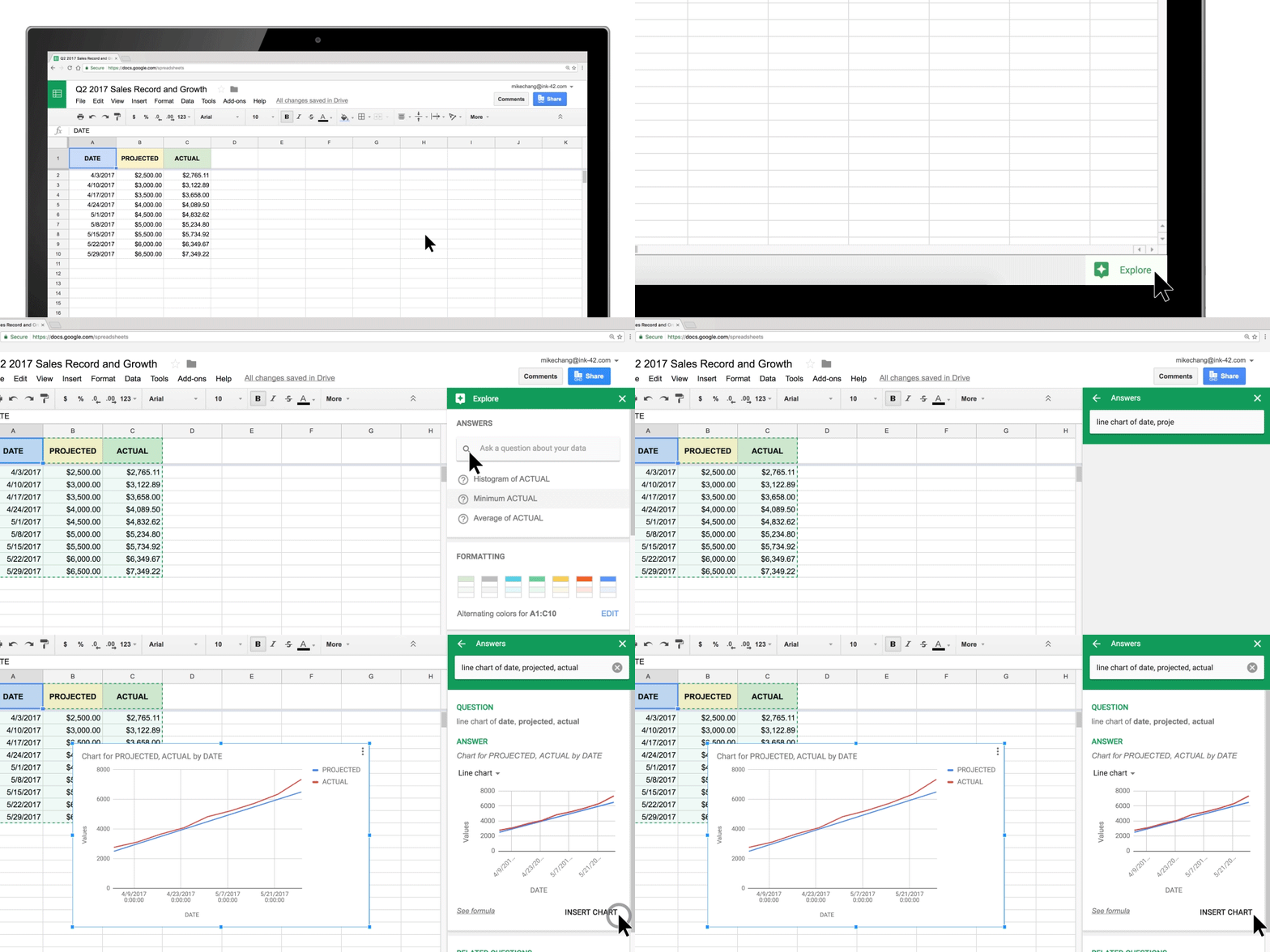
Google adds some fancy charting features to Google Sheets – What’s New at Google
Image: www.blog.google
Google Sheets has introduced machine learning into its skill-set through the Explore feature. You can use natural language searches for data you have in your spreadsheet workbook and get that data visualized more easily.
If you’re a Small Business trying to make better decisions, the more you can centralize your data into Google Sheets and make it visual, the easier those decisions can be. You can export data from Google Analytics, your CRM, and recent purchase information from your Point of Sale or invoicing software, then import those into one Google Sheets workbook. From there, you can use the Google Sheets Explore feature to unearth insights that will help you create stronger customer relationships.
Google NoCaptcha arrives – What’s New at Google
So, we all know the bane of Internet’s existence are spammers, hackers, and trolls. But, for the average user, the most prevalent annoyance are the images that you need to decipher and complete in order to complete forms, known as CAPTCHA/reCAPTCHA.
reCAPTCHA is a free service that protects your website from spam and abuse. reCAPTCHA uses an advanced risk analysis engine and adaptive CAPTCHAs to keep automated software from engaging in abusive activities on your site. It does this while letting your valid users pass through with ease.
reCAPTCHA offers more than just spam protection. Every time our CAPTCHAs are solved, that human effort helps digitize text, annotate images, and build machine learning datasets. This in turn helps preserve books, improve maps, and solve hard AI problems.
Of course, this is less than ideal, because the onus is on your fickle website visitor to have the patience to complete the reCAPTCHA puzzle in order to submit a contact or other types of forms on your website. Google is solving this with invisible NoCAPTCHA. With the new NoCAPTCHA, the common website visitor won’t see a reCAPTCHA puzzle unless they’re identified as a likely spammer. The website publishers and visitors the world over all exhale a collective sigh of relief.
As a business website publisher, all you need to do is setup Google reCAPTCHA on your website, and the rest is taken care of for you by Google.
Google brings Smart Reply to Gmail on Android and iOS so you never have to type again – What’s New at Google
The last update I wanted to cover is Google’s update to its mobile apps for Gmail. They’ve implemented Inbox by Gmail’s Smart Reply functionality into Gmail Mobile. This is great for those one word to one sentence responses that comprise of many email messages we receive on a daily basis. This is available in the consumer-side Gmail and in G Suite Gmail, so check it out and see if it’s helpful to your productivity.
More Updates – What’s New at Google
Here are some other highlights over the past few months, if you want to dig deeper:
G Suite ← Use this signup link to try G Suite Business with a free trial. If you want to keep it, I can give a discount on your G Suite account, covering your first year of service. See these instructions and request a redemption code.